Just one year of this blog – 2005 – is about 200 pages after using Blog2Print. To have them print it in soft cover would cost $78. I’m really tempted. Is this cool or what? Just a couple clicks and all those blog posts get formatted nicely to fit on printed pages
Hmmm – the image below is supposed to be a live preview of the book. You click on the green arrows to go to next/previous pages. Either it isn’t working, or it just takes a long time.
Well, we’re back in Fort Lauderdale. Same park where we’ve stayed so many times before. Different site.
We have a busy week planned already! Kayuba Dive Club meeting on Monday evening. Women’s Executive Club luncheon on Tuesday. Happy Hour on Tuesday night, Toastmasters on Thursday morning and our own event, Microsoft Windows 7 Launch Party on Thursday night. Dinner with best friend, Chris and Richard on Saturday night.
I was about to write how lucky we feel to have such strong ties to a community at the same time that we have the consumate freedom of the RV lifestyle. … but I realize that I write about that every time we come back to Fort Lauderdale. Like this past post, “The Best of Both Worlds.”
We also have a *lot* of catch-up work to do. For the last month, with my Mom with us, we’ve been in tourist mode. It was all I could do to answer the most pressing emails and get our newsletter out. Now, I really need to concentrate to update our ‘Beginner’s Guide to Picasa’ for the new 3.5 version. I’ve promised to have the new version out by the end of the month and that’s only 1 week away. Then, next month, we’ll be flying out to California and visiting Google’s headquarters! More about that later – gotta get to work now.
You may have heard about the hands-on class we teach from our website, or past blog posts. We call it ‘Computer Boot Camp’ because it is Basic Training for computer users.
We find lots of people on the road are using a laptop for the first time. A lot of them don’t know about the switch on a laptop that turns the Wi-Fi capability on or off. And, they also don’t know what happens when they close the lid of their computer.
Some of these people have been using computers for many years as part of their work. When they were at work and something went wrong – they just called the computer guy. They can’t do that now, and there’s more they need to know. They need to know how to make backups. They need to know about computer security and maintenance.
Jim and I have been in the computer support business continuously since the early 80’s. Since we’ve been on the road and helping our fellow RVers, we’ve compiled a checklist of essential knowledge and skills we believe every computer user should possess. We developed this class – and many of our Show-Me-How Videos – to help people fill in the gaps in their knowledge.
As you can imagine, with the wide variety of information to teach and the wide variety of experience levels in the class, this is not an easy class to teach. To keep everyone on track, we’ve written a workbook and recorded Show-Me videos to guide us through the class. You can click on the picture of the workbook to see the table of contents.
The class is broken up into 3 sessions with 2 or 3 specific exercises to be completed in each session. Much of the class is taught by the videos (that’s why you see the headsets in the photos), so people can learn at their own rate. And, there are many more videos on the disk than what we cover in class – there’s *no* reason to get bored in this class! You can click on the disk image below to see the disk contents.
Here’s the review questions for the class, why don’t you take it and see how you do? If you can confidently answer all the questions, then the class is too basic for you.
If you’re unsure of half or more, then the class would be great for you. And, if you’re in the vicinity of Celina, Ohio at the end of September, you can sign up for the Boot Camp at the Gypsy Gathering Rally. The cost is $99 for the two day class, bring your own computer.
If you have any questions, or you’ve attended one of our boot camps and have any comments, we’d love to see them as a comment to this blog post.
If you know of a rally, or an RV park where they would like us to present our Boot Camp, we can do that too. We need a minimum of 6 attendees, and a maximum of 20. Of course, it needs to be somewere in our vicinity. We plan to spend the winter in Florida.
If you’re interested in the Boot Camp, but you can’t attend a class, you can purchase the book and DVD for $20. Here’s the introductory video to the DVD.
In addition to our normal seminars and Jim's 'Help-Desk' hours, I did a few private lessons this week as well. You'd be surprised how many RVers use computers and need help! When we first started RVing in 2003, our estimate was that about 50% of all the RVs we saw had a computer inside. Now we think that it's 90%! And - 50% of those have 2 computers! This is simply a reflection of how important computers have become to everyday life. And, the Internet has become a necessary 'utility' akin to electricity, water, or telephone.
I just have to brag about one particular teaching session this week. He's a retired doctor. This is his first computer. He and his wife were in this park just for a short time. He took one of our seminars, then scheduled a private lesson for himself and his wife. He told me that his wife liked to write, but she was reluctant to even touch the computer. After the lesson, she seemed excited to start. Just a little bit of training helped break the ice. And, he scheduled another session for himself. When we were finished he gave me a check, but the real payment was the spontaneous hug he gave me. He said that he's accomplished some very difficult feats in his life - becoming a medical doctor and becoming a boat captain among them - but this computer was a challenge that had been defeating him until now. My training put him on the right path and gave him confidence.
It may not be solving world hunger, or curing cancer, but Jim and I feel really good about what we do!
Check out this computer-in-the-dashboard.
This is an option in a Tiffin Allegro Bus. It isn't just a navigational computer - it's a full-fledged Windows XP computer. Someone in the park had one of these and they showed it to us. They had never used it except to play DVDs. Jim set them up with a WiFi adapter so they could get it online and downloaded all the XP updates they needed. Now both of them can be browsing the web. She on her laptop, and he from one of the front seats. It's about time we started seeing some real computer options in motorhomes.
What we're still waiting for is to see outdoor mounted WiFi antennas as an option. Right now, people still have to rig their own. Here's one that we helped set up for a neighbor in the park.
It's a WaveRV marine-type antenna/USB adapter, strapped to a Walmart-special telescoping pole, strapped to the awning support. Works great. He is parked about 6 sites away from us and, with this antenna he gets a good connection to our network. He even uses it to make Skype phone calls to Europe and said it worked fine - once you get used to the delay caused by satellite connection. He promised to only use it for phone calls between 5 and 6 am because that is a bit of a bandwidth-hog and could noticeably slow us down.
And, one last picture ... would you believe that Santa comes to our computer classes?! Always wondered what he did the rest of the year. He leaves the sleigh behind and goes RVing!
Read more about him, and see a photo in full dress at Ron's Blog.
We gave our 'Every RVer Needs a Blog' seminar today. I'm expecting great things from this group! We had about a dozen people and they all brought their laptops. If any of the participants are reading this ... I hope you'll go to Geeks on Tour website and add your new Blog to the 'Your Blogs' list! Then we can all go visit.
One question I always get in these seminars is 'How can I search for other Blogs?' I'm afraid that I've never answered that question very well. It's been a long time since I've searched for new Blogs because I already have so many that I like to follow. If you're looking for RVing Blogs, I really like Hitch Itch - (see link at the left sidebar of this blog also). He categorizes his RV adventurers by 1)New Sites, 2)Sites updated daily or weekly 3)Sites updated monthly 4)sites updated irregularly. These aren't all Blogs - some are custom-designed websites - but ALL are about RVing adventures.
Right on Blogger's home page, they have a small 'search' button to search for Blogs. Blogger is owned by Google, so, I assume it's the same search as you'll get on a standard Google page. Just, instead of doing a normal Google search, click on the 'more...' button and select Blogs.
Once you're in a Blog search, you can also limit your search to just Blogs that have been updated within a specified period of time:
Google also provides a way to search within a Blog for whatever you want. So, for example, if you wanted to search this blog to find where we've mentioned our Safari motorhome, you would use the little search box in the upper left corner of the screen.
When you click 'Search' the blog will now show all posts where the word 'safari' appears.
Happy Hunting!
Jim did his Google Earth seminar yesterday and I'm starting to understand it enough to get hooked! Someone today came up and asked if you could use Google Earth to look at a river and see if it would be a good area to paddle. You know, no dams, no waterfalls, stuff like that.
What a good idea!
We are planning to paddle the Peace River this Sunday (our good friend, Marie, is coming to visit) and we want to do a little more distance than the last time.
Here is a video recording - a 'screencast' - of me using Google Earth to decide exactly where to paddle on the Peace River.
Whew! Y'never know when it's gonna be you that gets stuck in a computer quagmire with something like a server migration such as the Blogger conversion. It took about an hour and a half. I didn't have to do anything but wait, but it was a nervous time.
Next, I'm supposed to pick a new, upgraded template. One step at a time. I'll wait an read some more. Maybe I'll upgrade the template tomorrow.
Meanwhile, the main feature I was looking forward to is already available to me. It's called labels and it acts as a way to categorize all my Blog posts by topics that I define. I occassionally debate about whether this is a personal blog (about family, friends, RVing and Travel) or a business blog (about computer stuff). In Jim's and my life, we love what we do and we do what we love, the line between personal and work is very blurry, so we write about it all. We've been keeping this blog for over 3 years now and it would be nice to click on 'WiFi' and see all the posts we've written about WiFi. Click on RVing and see all the posts that have been specifically about the RV lifestyle etc. That's what 'Labels' are for, and I see the place on my screen right now to put labels on this post. I think I'll categorize this post as 'Computer' and 'Blogs'. Then, I'll start categorizing all my old posts and see how far I get.
Out with the old, in with the new. This seems to be a good time to migrate this blog to the new version of Blogger. I've backed it up every conceivable way, and I've been reading all the forum messages about other people's experiences. Lots of folks have had smooth migrations, taking just a few minutes and continuing on as if nothing had happened. Others have had 2-3 day ordeals. And a few have lost the ability to post to their blogs at all. So ... I figured I'd post this notice. If this blog is missing in action for a few days - don't worry, I'm working on it. If the worst happens, just go to our home page at www.jimandchris.com or www.geeksontour.com. Both of those have links to 'Blog' and I will post information there about what happened.
If you want to understand what's going on at Blogger, here is a good video to watch. You can also read more at Blogger Buzz.
Click here to watch video.
I am still concerned about using FTP to publish my site, and where photos will be stored. Blogger beta supports using FTP just like I have been, but I won't be getting the advantages of the new Blogger. Oh well, as long as this keeps working, I'm happy. Right now I'm still on the 'old blogger'. Someday soon, I expect to see an invitation to migrate to Beta. When I do, I will. Maybe I'll start a brand new blog on January 1. Still thinking.
We gave our first Picasa seminar here at Peace River yesterday, and, as part of the class we uploaded photos taken during class to a Picasa Web Album. The photo above is part of that album. You can click the link after the word 'From' to go to the album.
When you're viewing a picture in the album there is a link at the right to 'Embed in Blog/MySpace'. I clicked on that and it gave me the html code for the photo above. This is an interesting option for hosting photos for a blog. It still has them hosted at Google's free servers, but at least it's at a url that is mine (picasaweb.google.com/chrisguld/) rather than the photos1.blogger.com that you get when you let blogger upload for you.
Yikes! There's just TOO many choices, with more available every day. I think I'll go for a walk.
Blogger is undergoing major changes right now. I've been using Blogger to publish this blog for over 3 years. There have been some minor changes and improvements over that time, but this one is big. They are totally changing the way the back end servers do the publishing. It's called 'dynamic'. I understand the concept because that is what I do with databases and Coldfusion on the web. It is generally a very good thing. It will mean much faster and more dependable publishing.
HOWEVER - there is one major hurdle that I don't like. In order to use the new dynamic publishing that is being done by their backend servers, you must use their front end servers (blogspot.com) to host your blog - it makes sense - they can only dynamically control servers that are under their control. My blog is currently hosted on www.jimandchris.com, space that I pay for, it's mine. If I start posting on the blogspot.com then everything 'lives' on blogger's servers. I don't like that. Actually, I could live with the blog entries themselves living on blogspot, but not the uploaded pictures. What I want is to be able to publish my blog on blogspot using their new dynamic publishing, but have the 'upload photo' button allow me to upload to my own host.
If you didn't understand a word of that ... and you want to :-) ... read on.
You see, the pictures don't actually live in the blog post itself, they can live anywhere on the web and the code in the blog simply refers to them. Let me give you an example. I'll show you two pictures and tell you where they 'live' on the web.
The picture of the boy and the horse 'lives' at www.horsesforthespirit.org (a website I created). It has absolutely nothing to do with jimandchris.com and nothing to do with blogger. I simply happen to know the complete address of it's location and I can enter the html code to display it here on my blog page. (not something you normally want to do, by the way, copyrights apply - don't sue me ok?)
The picture of the little girl with the stuffed alligator 'lives' on www.diandy.com. A website of RVing friends of ours. It happens to be a picture of me :-). You can read about it here if you want.
So, what's all this mean?
Well, as long as those pictures continue to 'live' at the addresses I am referring to, you'll see them show up here. If Horses for the Spirit should ever move, or if Diandy.com should ever go away, the pictures will no longer exist and you'll see those annoying little red x's instead.
When Blogger publishes your blog to their servers, they upload your photos to their servers as well. That scares me. Who knows when they might have to replace a server and relocate files? When it's all for free, I just can't trust them to maintain the proper addresses so my picture references work for years to come.
If you've been following Tioga and George recently, you've already heard about this. He switched to Blogger Beta recently, and he's lost all his pictures from 2003. I actually don't think it has anything to do with Blogger beta - I think it's coincidence that the free servers that hosted his 2003 photos just bit the dust. For 2004-2006, he's hosted his blog and photos on his own website. Now he says he's going to publish *both* ways. I'm not sure how he'll do that, but it sounds interesting.
Blogger beta will still work to publish via ftp - but then, you're not getting the advantages of their new 'dynamic' publishing. I'm going to wait to the last minute to switch to Blogger Beta. Meanwhile, I keep watching. Here are some good places to keep on top of what's going on:
Blogger Help Official help from Blogger/Google
Blogger Buzz Official Blog about Blogger by Google employees
Blogger Support Users Forum Official User forum
Report a problemBloggerTalk 3d party blog about blogging, with a user forum
Beta Blogger for dummies 3d party blog about Blogger Beta
Testing Blogger Beta 3d party blog
And, I'm sure there's lots more, but that's enough for now. More than you probably ever wanted to know!


 This is an option in a Tiffin Allegro Bus. It isn't just a navigational computer - it's a full-fledged Windows XP computer. Someone in the park had one of these and they showed it to us. They had never used it except to play DVDs. Jim set them up with a WiFi adapter so they could get it online and downloaded all the XP updates they needed. Now both of them can be browsing the web. She on her laptop, and he from one of the front seats. It's about time we started seeing some real computer options in motorhomes.
What we're still waiting for is to see outdoor mounted WiFi antennas as an option. Right now, people still have to rig their own. Here's one that we helped set up for a neighbor in the park.
This is an option in a Tiffin Allegro Bus. It isn't just a navigational computer - it's a full-fledged Windows XP computer. Someone in the park had one of these and they showed it to us. They had never used it except to play DVDs. Jim set them up with a WiFi adapter so they could get it online and downloaded all the XP updates they needed. Now both of them can be browsing the web. She on her laptop, and he from one of the front seats. It's about time we started seeing some real computer options in motorhomes.
What we're still waiting for is to see outdoor mounted WiFi antennas as an option. Right now, people still have to rig their own. Here's one that we helped set up for a neighbor in the park.
 It's a
  Read more about him, and see a photo in full dress at
  Once you're in a Blog search, you can also limit your search to just Blogs that have been updated within a specified period of time:
 Google also provides a way to search within a Blog for whatever you want. So, for example, if you wanted to search this blog to find where we've mentioned our Safari motorhome, you would use the little search box in the upper left corner of the screen.
 When you click 'Search' the blog will now show all posts where the word 'safari' appears.
Happy Hunting!
When you click 'Search' the blog will now show all posts where the word 'safari' appears.
Happy Hunting!

 Click here to watch video.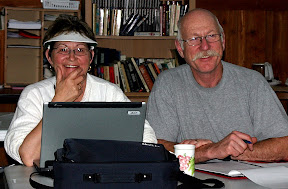


 The picture of the boy and the horse 'lives' at