Sunday, July 13, 2014

The Scenic Route thru Colorado

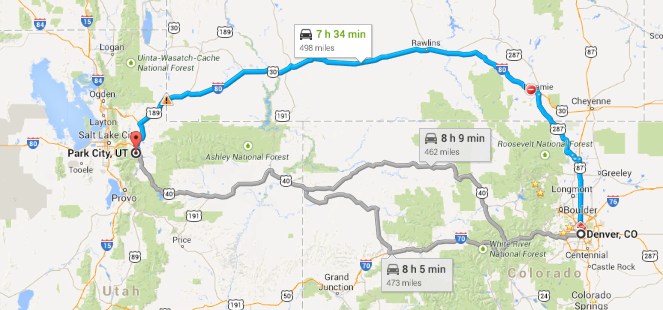
If you ask Google to take you from Denver to Park City, UT it wants you to drive north to Wyoming and then west on 80. But notice that it does acknowledge some alternate routes that go thru the mountains straight west of Denver. That's what I wanted. The scenic route! What do I care if it's steep grades and curvy? Jim does the driving!

Not only was it steep and curvy, but there was lots of construction and it was raining!


I still think it was worth it. Beautiful scenery! Here's the area near Glennwood canyon.


We planned to find a place to stay somewhere around Glennwood, but no such luck. I found all the campgrounds available using my Allstays Camp and RV app, and tried calling them. All full. So, we ended up in the Walmart parking lot in Rifle, CO. There were "no overnight parking" signs all over the place so we were a bit worried even there. We had some shopping to do so, once inside Walmart, we found a customer service manager and asked about parking overnight. "No Problem" she said. OK. And, here's the view from our bedroom window. Not bad.


The next day we headed straight north out of Rifle. It was a small road, but well maintained. Jim pulled off the road for a delightful lunch stop.

I'm so glad we took the scenic route!


We actually had reservations for our next destination near Park City where we planned to meet up with our old friends Tom and Margo Foster who recently bought a vacation home there. Unfortunately, we arrived a day before our reservation and we were told there were no spaces available at that park. We called around, and everyone was full! So, it was another Walmart night. This time in Heber City, UT.

The location of our production studios for the 3d Episode of our weekly show.

Our main concern was Internet because we had to do our weekly show on Sunday. This was our third episode of "What Does This Button Do?" Pretty amazing that we can produce a worldwide broadcast from our RV using the generator for electricity, our cellphones for Internet connection (Verizon was actually very good at the Walmart!.) We did mess up and not have our sound set correctly though. We talked for over 13 minutes before getting the message that no one could hear us! We've edited that out, and you can watch the recording of WDTBD Episode 3, along with all the other archives at www.GeeksOnTour.tv/wdtbd

Our view of the super moon the next morning was made even more super looking out our bedroom window in a Walmart parking lot!


Further your computer education**Subscribe to the Free Geeks on Tour Newsletters**

Friday, July 11, 2014

Wait Wait...Don't Tell Me

By Jim

Chris thinks I should write a Blog post every now and then. I used to write on occasions like my parent's birthdays and anniversaries and things like that. Now they are gone, certainly not from my memory, just nothing new happening with them. Dad's birthday is coming up on the 17th. I miss you, sir.

We, on the other hand have lots going on with us. At least it seems that way to me.
When Chris returned from Florida, we were able to get a site at one of our favorite campgrounds in the country, Golden Clear Creek RV. We wanted to be there because we had tickets to an event at Red Rocks Amphitheater nearby.
Our seats were much closer to the stage

Wait Wait... Don't Tell Me is the NPR Radio news quiz. It's a fun weekly radio show with a huge following. They tape it Thursday nights in front of a live audience, usually in Chicago, but regularly at other venues around the country. We knew they were going to be in the Denver area around the same time as us, so we made it happen. Peter Sagal is the host. There is a panel of three who answer questions about the week's news.


8500 fellow fans enjoying the show


The public can call in and participate to win a valuable prize, Carl Kasell's voice for their voice mail.
Paula Poundstone is our favorite panelist. Tom Bodett and Brian Babylon were the other panelists. Bill Curtis is the announcer and scorekeeper. We have heard some hilarious moments on the show over the years.
If you don't recognize any of those names, you are missing out on some unique entertainment.
The completed show is aired on NPR stations on Saturday mornings. We're usually doing something else at that time, so we have made a ritual of listening to the Internet podcast on Sunday mornings. I'll be talking about the mobile app I use to listen to podcasts on our weekly Geeks On Tour show, What Does This Button Do? Be sure to tune in Sundays at 2pm Eastern time.

This was our second visit to Red Rocks, but the first event attended. Here is the link to the post the last time were were here. It is a great place to see a concert or view an event like WWDTM.
If you are ever in the Denver area, check it out. I know we'll be back.


Chris does a great job chronicling our travels here, doesn't she? I seldom feel the compulsion to write. I do most of the driving. She does all the writing. That's our deal.
Do you think it is better that way?


Further your computer education**Subscribe to the Free Geeks on Tour Newsletters**

Thursday, July 10, 2014

Flowers, Glass, and HDR photos

We got an email from a Geeks on Tour member who noticed that we were in the Denver area and she recommended that we visit the Denver Botanic Garden. When we responded that it sounded like a great idea, she came out to our RV and delivered a pair of admission tickets!  Thanks Karen! It was a very special day. A true feast for the eyes. I just couldn't snap enough pictures! With my good camera (Canon T3i) I took 3 exposures of each shot and let Google+ Photos turn them into Auto-Awesome HDR pictures. But then I also had to take some pictures with my cellphone - a Samsung Galaxy S5 - it does a great job. I'm wondering if you can tell which pictures come from each camera!?


What is HDR? It stands for High Dynamic Range and it means the range of light that occurs in the photo. The primary purpose is to take a good picture of a scene that has very bright areas as well as very dark areas. Here is the explanation we give in our Smartphone Photography workshop.


By the way, we'll be offering our smartphone photography workshop at the upcoming FMCA Convention in Redmond, OR  August 13-16.
My Canon T3i camera does not have a setting called HDR. What you do is use the Exposure Bracketing feature and take 3 pictures in a row of each shot. The first will be 'normal' exposure, the second is underexposed and the 3d is overexposed. I let Google+ Photos automatically upload all the photos to my cloud account and when it notices these 3 bracketed pictures it will use it's "Auto-Awesome" feature to put them together into an HDR photo. Here's an example:

I've written about this Auto Awesome feature of Google+ Photos in my PicasaGeeks.com blog. We also have a member tutorial video on Google+ Auto Backup and Auto Awesome.  This process not only gets the exposure right for the dark and light, but because it overlays 3 pictures, it also produces much richer colors. Often the end result looks more like a painting. It's easy for it to get overdone, but it also produces some very pretty pictures!
I knew that many of the HDRs from this day at the gardens would be over the top because the real colors were already over the top. But, isn't it cool?

As always, more pictures in our Web Album for July.

Wednesday, July 09, 2014

I just flew to Fort Lauderdale and back–boy are my arms tired!

I knew I wanted to go home and visit Mom sometime during the summer. The first week of July – flying out of Denver seemed to fit just right. And it’s her birthday! Perfect. Jim stayed in the parking lot at the Elks lodge. We had really nice neighbors there – here’s Ingrid. She’s another blogger and we chatted a bit about Picasa. See her blog – and beautiful pictures – at LiveLaughRV.com

I really enjoy how our smartphones have made flight arrangements easier. No need to buy a paper ticket, no need even to print anything out from a computer before you go. It’s all in an email on my phone, including the scannable boarding pass. It does work, but I found it easier to go to one of the kiosks, use the code from my email, and get a printed ticket. I hate fumbling with my phone when there’s a line of people behind me. For some unknown reason it even printed me a TSA priority ticket so I got in the short line and didn’t have to take my shoes off going thru security.
I still ask for a window seat!

No clunky camera anymore either – just the phone! I got in to Fort Lauderdale airport about midnight and picked up my cute little rental car. My first order of business in the morning was to get a haircut, then I went over to visit with Mom.

It seems to be going quite well with the Assisted Living Facility I moved her to before we left in April. She still recognizes me – although she registered no surprise at all to see me approach her. She is at that stage where she just accepts what her eyes see, no questions asked. The next day, Dee had the idea of making a little picnic to eat in her room – tablecloth and all!

In my off time, I went shopping! I got a new Samsung Note 10.1 from Best Buy to use on our Sunday show. Jim and I are now doing a weekly show on using smartphones and tablets. We call it “What Does This Button Do?” There is just so much to learn about smartphones and tablets that we need the motivation of a weekly show to keep up! We’re using Google+ Hangouts On Air to produce the show. It’s completely free! So cool. To teach this stuff we need to demonstrate it – so just a webcam focused on our faces doesn’t do the trick. We like to use the cameras on tablets to be our stage camera – then we can switch to the rear camera to show the other devices. Long story short … I needed another device – so I got one! And it worked great – we did our second show while I was in Fort Lauderdale and Jim was in Denver! If you want to see what we have to teach on both Android and Apple mobile devices tune in on Sundays at 2pm EDT. You can see the archived shows on our website at www.geeksontour.tv/wdtbd That will tell you how to watch the upcoming live show as well.

Monday was Mom’s birthday and my friends Chris and Dee helped me celebrate it with her by going to a favorite restaurant right on the beach – Sea Watch.

All in all it was quite a successful visit. Back on the plane – this time I took photos with my new tablet! Oh, I also made a video about the new tablet. I think this one could be the answer for people who want to leave the computer behind when they go traveling, but need to get the pictures off the camera and onto something like a computer for viewing.
Watch this video and see what you think (http://youtu.be/JeK8aOSeAs0):

Back on a plane leaving Fort Lauderdale.

Getting into Denver

Jim picked me up and took me to dinner at a cool restaurant on a golf course not too far from the airport. Bison Grill.

Hi Honey! I’m Home. Here’s a photo Jim took as we left the restaurant – I’m showing off my new Samsung Tablet. Notice how it doesn’t look like I’m holding onto it? I also got a “HandEHolder” to make it easy to hold onto.

Remember, you can see more photos on our monthly web album for Julymonthly web album for July. Or you can see any month by clicking on the menu above for “Our Photos.”